Evaluating Puzzle Mockup PSD for Your Design Projects
When preparing a presentation for a client, building a portfolio piece, or testing a concept, the way you display your work can influence how it is received. A puzzle mockup PSD offers a structured way to present designs within interlocking puzzle-piece templates, adding a layer of visual storytelling to what might otherwise be a flat screen shot or a standalone graphic. Below we examine what a puzzle mockup PSD actually provides, the reasons designers turn to it, the tradeoffs involved, and how to decide whether it fits your particular needs.
What a Puzzle Mockup PSD Actually Provides
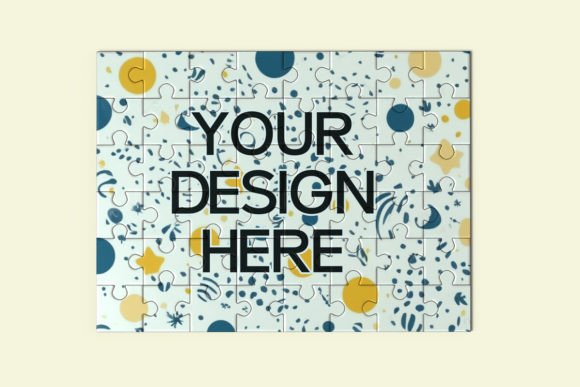
A puzzle mockup PSD is a layered Photoshop template that places your artwork inside the shapes of puzzle pieces. The file typically includes smart object layers, which allow you to insert your own design into each piece with a few clicks. The puzzle theme can range from a few large interlocking tiles to dozens of small, irregular pieces arranged on a surface, often with realistic shadows, textures, and lighting effects already built in.
These mockups are not about the puzzle itself as a physical product. Instead, they use the puzzle visual as a metaphor or framing device. The goal is to show how separate parts of a design come together as a whole, or to emphasize that a concept has multiple components that fit into a larger narrative. The PSD format gives you control over which pieces are visible, how they are arranged, and what background or environment surrounds them.
It is important to understand that a puzzle mockup PSD is a presentation tool, not a design tool. It does not help you create the puzzle game or generate printable puzzle templates. Its value lies in how it presents finished work to viewers.
Why Designers and Marketers Consider Using One
Interest in puzzle mockup PSD files usually comes from a need to communicate complexity or interconnectedness in a visually immediate way. If you have a branding package with several elements — a logo, color palette, typography system, and pattern — showing those elements as separate puzzle pieces that fit together can help clients see how each part supports the whole. The same logic applies to campaign assets, app screens, or any set of related visuals that benefit from being seen together rather than in isolation.
Another reason people seek out these mockups is differentiation. Many portfolios and social media posts rely on standard device mockups or flat image grids. A puzzle presentation stands out because it introduces an unexpected format that invites closer inspection. For designers looking to make a memorable impression in a competitive space, the novelty of the puzzle layout can be an advantage.
Additionally, puzzle mockups can reduce the time needed to create a polished presentation from scratch. Instead of arranging individual images, adding shadows, and adjusting lighting manually, you get a ready-made environment that requires only inserting your artwork.
Practical Benefits You Can Expect
When used appropriately, a puzzle mockup PSD offers several concrete advantages. First, it enforces visual consistency across all displayed pieces. Because the mockup uses the same lighting, perspective, and texture for every puzzle piece, your designs appear cohesive even if they come from different source files or were originally created at different times.
Second, the interlocking nature of puzzle pieces naturally guides the viewer to consider relationships between elements. This can be especially helpful during client presentations where you need to explain how a primary logo relates to secondary marks, or how a mobile interface connects to a desktop version. The format subtly reinforces the message that your design system is integrated, not random.
Third, many puzzle mockup PSD files include flexible customization options. You can hide certain pieces to emphasize individual components, rotate pieces to create dynamic compositions, or change the background to match your brand colors. This flexibility lets you adapt the same base mockup to different projects without starting from scratch.
Tradeoffs and Limitations to Keep in Mind
No single presentation format works for every situation, and puzzle mockup PSD files come with notable tradeoffs. One of the most significant is that the puzzle format can distract from the actual design. Viewers may spend more time looking at the puzzle pieces themselves — their textures, shadows, and arrangement — than at the artwork you placed inside them. If your goal is a clean, distraction-free view of the work, a puzzle mockup may work against you.
Another limitation is file size and complexity. High-quality PSD mockups with multiple smart objects, layer effects, and realistic renders can be large and slow to work with, especially on older computers. If you need to iterate quickly or share files with collaborators who have limited hardware, the mockup may become a bottleneck rather than a time-saver.
There is also the question of relevance. A puzzle theme may not align with every brand or project. For a serious corporate identity or a medical or financial service, the playful connotation of a puzzle could feel mismatched. Similarly, if your audience is not familiar with the puzzle-as-metaphor concept, the presentation might come across as confusing or gimmicky.
Finally, the level of customization matters. Some free or inexpensive puzzle mockup PSD files offer only basic smart object replacement with no control over lighting, shadows, or perspective. If you need a highly polished result, you may need to invest in a premium file or spend additional time adjusting the template to match your vision.
When Puzzle Mockup PSD Is a Strong Fit
Based on the benefits and limitations above, there are several scenarios where a puzzle mockup PSD is likely to serve you well. It is particularly effective for:
- Brand identity presentations where you need to show multiple brand elements working together as a system.
- Campaign or ad sets where different creatives share a common theme and you want to demonstrate visual continuity.
- Portfolio projects that benefit from a memorable, discussion-starting layout, especially when applying for creative roles or pitching to new clients.
- Concept pitches where you want to emphasize that your proposal includes several interconnected components that form a complete solution.
- Social media showcases where standing out in a crowded feed matters and the puzzle format can increase engagement.
In these contexts, the puzzle layout reinforces the message you are trying to communicate rather than competing with it.
When Alternatives May Be Worth Considering
There are also situations where you are better off choosing a different presentation approach. Consider alternatives if any of the following apply:
- You need minimal distraction. If the design itself needs to speak without any framing interference, a plain image grid, a simple device mockup, or a full-bleed presentation will serve you better.
- You work in a conservative industry. For law firms, financial institutions, healthcare organizations, or government clients, a puzzle theme may feel too informal or playful. A clean portfolio layout or a standard presentation template is safer.
- You are presenting a single hero image. The puzzle format works best for multiple pieces. If you only have one key visual to show, a mockup with a single puzzle piece can look forced or incomplete. A dedicated poster or screen mockup is more appropriate.
- Your audience is unfamiliar with the mockup concept. If you are presenting to stakeholders who are not design-savvy, they might misinterpret the puzzle pieces as a suggestion to create a physical puzzle product rather than as a presentation metaphor. Clear context and explanation can help, but it adds overhead to your presentation.
- You need rapid iteration across many files. If you are producing dozens of presentation images and need speed above all else, the overhead of working with layered PSD files may outweigh the visual benefit. Batch processing in a simpler tool might be more efficient.
Practical Decision-Making Insights
To decide whether a puzzle mockup PSD aligns with your goals, start by clarifying what you want the presentation to accomplish. Are you trying to demonstrate integration, attract attention, or simply display work clearly? If integration or memorability is the primary goal, a puzzle mockup is likely a reasonable choice. If clarity and minimalism are more important, simpler formats will usually perform better.
Next, consider your audience. If you are presenting to other designers or to creative directors who appreciate novel presentation formats, the puzzle approach is likely to be well received. If your audience includes non-creative stakeholders who prefer straightforward visuals, you may want to test the mockup on a colleague before committing to it.
Budget and time also matter. Premium puzzle mockup PSD files from reputable marketplaces cost anywhere from a few dollars to around twenty dollars, which is modest for a tool you may reuse across multiple projects. However, free alternatives often lack the polish and flexibility needed for professional work. Factor in the time required to learn the file structure, replace smart objects, and make custom adjustments. If you only plan to use the mockup once, a free option or a simpler alternative may be more practical.
Finally, evaluate the specific file before downloading. Look for previews that show the mockup with real artwork inserted, not just empty puzzle pieces. Check whether the file includes multiple piece arrangements, background options, and layer organization that matches your workflow. Read reviews or comments from other users to gauge real-world usability.
How to Test Whether It Works for You
If you are still unsure, the most practical step is to try a single puzzle mockup PSD on a small project before committing to it for a major presentation. Insert one of your existing designs into the template and evaluate the result on three criteria:
- Does the puzzle format enhance or distract from the design content?
- Does the mockup look polished enough for your intended use (client meeting, portfolio, social media)?
- Does the process of replacing artwork and adjusting the file feel efficient or cumbersome?
Based on this test, you will have a clear sense of whether the puzzle approach aligns with your workflow and standards. If the answer is positive, you can expand its use. If it falls short, you have lost only a small amount of time and can move on to a more suitable format.
Final Considerations
A puzzle mockup PSD is a specialized presentation format that works well in the right context but is not a universal solution. Its strength lies in visually communicating how separate pieces fit together, which makes it a natural fit for branding, campaign, and system-level presentations. Its limitations include potential distraction, file complexity, and a playful tone that may not suit every industry or audience.
The most effective use of any mockup is one that serves the work rather than overshadowing it. By evaluating your project goals, audience expectations, and practical constraints, you can decide whether a puzzle mockup PSD will help or hinder your presentation. When the fit is right, it can make your work more memorable and easier to understand. When it is not, a simpler alternative will almost always deliver better results.