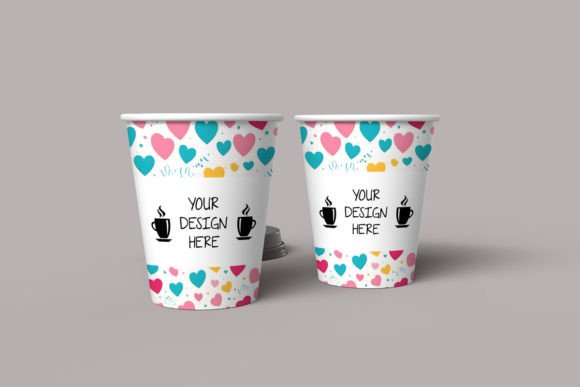
Paper Cup Design Mockup PSD: Real Ways Creators and Businesses Use It
Picture this: you have just finished a branding project for a local coffee shop. The logo works perfectly on the menu board, the color palette feels warm and inviting, and the typography matches the vibe. But something is missing. The client wants to see how the design will look on an actual cup. Printing a short run just for a presentation feels wasteful, and taking a photo of a plain cup with a sticker slapped on never looks right. That is where a Paper Cup Design Mockup PSD becomes the most practical tool in your creative kit.
A Paper Cup Design Mockup PSD is a layered Photoshop template that lets you place your artwork directly onto a realistic three-dimensional paper cup. The file usually includes smart object layers, shadows, reflections, and background textures that make your design look like a professional product photo. No need for a studio setup, no need to print prototypes, and no need to shoot hundreds of photos until the lighting works. You drop your design in, adjust a few settings, and you get a convincing visual that you can use immediately.
Pitching a brand identity to a café or beverage client
When you present a brand identity to a client who runs a coffee shop or a juice bar, they want to see how everything comes together. A logo file on its own feels abstract. A business card mockup helps, but a paper cup says something different. It shows the client that you have considered the full customer experience. They can imagine someone walking down the street holding that cup. You can show multiple color variations of the same design or put a seasonal holiday motif next to the standard version. The client sees the potential without having to order a test print. That makes the decision process faster and less risky for them.
Building a stronger portfolio for freelance work
If you are a freelancer trying to land more packaging or branding projects, your portfolio needs to feel tangible. Realistic mockups make conceptual work look like real-world output. Even if a project was never actually printed, a Paper Cup Design Mockup PSD allows you to present it as if it was. Potential clients browsing your site will see a professional product shot rather than a flat design file. That visual credibility often makes the difference between getting a reply and getting ignored. Many designers I know include mockups for every project they showcase, even the ones that stayed digital.
Creating social media content for product launches
Beverage brands, bakeries, and cafes rarely have the budget or time to organize a full photoshoot every time they launch a new drink. A Paper Cup Design Mockup PSD gives them a way to generate on-brand visuals quickly. You can place a new matcha latte design on a cup, add a simple background, and post it on Instagram or Facebook within minutes. The same file works for promotional emails, website banners, and even printed flyers. For a small business owner who wears multiple hats, this makes a big difference. You do not need to hire a photographer or a designer every time you want to update your look.
Unexpected Scenarios Where a Paper Cup Mockup Helps
You might think paper cup mockups are only for coffee shops and graphic designers, but the reality is wider. Think about event planners who organize weddings or corporate gatherings. Custom cups printed with a couple names or a company message are popular favors. With a mockup, the event planner can show the client exactly what the cup will look like before placing a bulk order. That reduces the chance of expensive mistakes. The same goes for schools or nonprofit organizations running fundraisers. You can mock up a design showing the school mascot or the charity logo, share it with stakeholders, and get approvals fast.
Bloggers and content creators also find these mockups useful. If you run a lifestyle blog or a YouTube channel about product design, you might want to show hypothetical concepts or brand ideas to your audience. A Paper Cup Design Mockup PSD lets you produce visuals that feel polished without revealing unfinished work. You can talk about design principles while showing a realistic example that keeps the viewer engaged. Educational settings benefit too. Teachers and workshop facilitators use mockups to demonstrate how packaging design works in practice. Instead of lecturing about smart objects and layer masks, they show students how a design moves from 2D flat file to a 3D object in minutes.
What to Consider Before Choosing a Paper Cup Mockup PSD
Not every mockup file performs the same way. Before you download or purchase one, it helps to think about a few practical points.
File format and software compatibility
Most PSD mockups require Adobe Photoshop. If you use another image editor, you might run into issues with smart object layers, adjustment layers, or 3D rendering. Check the description carefully. Some mockups also come with additional files like JPEG previews or separate layer comps for different angles. If you work mostly on a tablet or a phone, a Photoshop file will not help you. In that case, look for mockups offered as templates for other software or even browser-based tools.
Lighting and perspective
A mockup that looks good in one context might feel wrong in another. If your design includes bright neon colors and your mockup has a soft golden hour shadow, the result can look mismatched. Look for mockups that offer multiple lighting options or neutral environments. You want the cup to appear realistic without overpowering your artwork. Perspective matters too. A straight-on view works for menus and catalogues, but a three-quarter angle often looks more natural on social media. Think about where the final image will appear and choose a mockup perspective that fits.
Editable layers and customization depth
Some mockups give you complete freedom. You can change the background, adjust the reflection intensity, modify the shadow, and even swap the cup material. Others are more rigid. You drop your design into a smart object and the file does the rest. If you like to fine-tune every detail, go for a file with multiple editable layers. If you just want a quick visual for a client call, a simpler file saves time.
Bringing Features Down to Earth
When you read product descriptions for Paper Cup Design Mockup PSD files, you see phrases like smart object integration, high resolution, and photorealistic rendering. Those terms matter, but what they mean in practice is simple. Smart object integration means you double-click a layer, paste your design, save, and the cup updates automatically. That saves minutes per revision, which adds up when you have ten design variations to show. High resolution means the final image looks good printed or displayed on a large screen. You do not want your client to zoom in and see pixelated edges. Photorealistic rendering means the shadows, highlights, and cup texture look like a real photograph. You get a convincing result without owning a camera or a light kit.
Another feature worth noting is the inclusion of multiple cup angles or variations. Some mockup packs include a front view, a side view, and a slight top-down angle. Others also offer a cup sleeve option or a bundled set of similar cups with different lid colors. If you frequently design for beverage brands, having those options in one download keeps your workflow organized.
Practical Examples You Can Apply Right Now
- Freelancer pitching a rebrand: You create a new logo set for a tea shop. You want to show the logo on their existing cups versus a refreshed design. You open the mockup, place the current logo into one layer, place the new logo into another, and export two side-by-side images. The client sees the comparison immediately and understands the value of the update.
- Small business owner launching a seasonal drink: You own a smoothie bar and want to offer a pumpkin flavor for autumn. You mock up the cup design, post it on social media with a caption teasing the launch, and see customer reactions before ordering any packaging. The feedback helps you adjust the design before committing to a print run.
- Design student building a portfolio: You have a class project where you created a brand for a fictional juice company. You use a Paper Cup Design Mockup PSD to present the final brand as if it were already on shelves. Your instructor sees the work in a realistic context, and your portfolio stands out from projects that were only shown as flat files.
- Event planner seeking client approval: You plan a wedding reception and propose custom cups with the couple first names and the wedding date. You mock up the design, email it to the bride and groom, and they confirm the style within hours. No need to order samples or guess what the final product will look like.
What Keeps People Coming Back to PSD Mockups
The main reason people keep Paper Cup Design Mockup PSD files in their toolkit is flexibility. One file can serve a freelance project in the morning, a personal branding exercise in the afternoon, and a social media graphic later that evening. You do not need to learn new software or adjust your workflow dramatically. The interface stays the same whether you are a seasoned designer or someone who only opens Photoshop once a month. That low barrier to entry matters when you are balancing multiple responsibilities.
Another reason is cost. A single mockup file often costs less than one coffee shop latte. Compared to hiring a photographer or buying a test print run, the upfront investment is insignificant. Over time, that small purchase pays for itself many times over. Some creators own a small library of mockups covering different cup styles, backgrounds, and lighting conditions. They grab the right file depending on the project, which keeps their output consistent without repeating the same visual formula.
Staying Aware of Licensing and Usage Rights
Before you use any Paper Cup Design Mockup PSD for commercial projects, take a moment to read the license. Some files are free for personal use but require a purchased extension for commercial work. Others allow unlimited commercial use from the start. If you plan to sell the final images to clients, or if you use them in products that generate revenue, make sure your license covers that scenario. The consequences of ignoring licensing terms range from a takedown notice to legal action. It is a simple check that protects your time and your reputation.
Making It Work Without Overthinking
You do not have to be an expert in lighting, shadows, or 3D rendering to use a Paper Cup Design Mockup PSD effectively. The file does most of the heavy lifting. Your job is to bring a good design and place it where it belongs. If the artwork looks strong on its own, the mockup will only enhance it. If the design is weak, no amount of realistic shadows will save it. Focus on the quality of your artwork, and treat the mockup as a presentation tool that helps others see what you already see.
When you approach these mockups with a clear goal, whether that is winning a client, building a portfolio, launching a product, or teaching a concept, the process becomes straightforward. You are not chasing perfection. You are communicating an idea effectively. That is what makes the Paper Cup Design Mockup PSD a genuinely useful asset across so many personal, professional, and creative settings.